

Personal profile, signature and session security
Manage your account preferences separately from clinic settings.
Platform · Last verified:
Open Settings in the header. Personal profile/notifications/Veti/signature/security differ from Clinic Settings. Switching tabs does not complete an unsaved form.
Profile and phone
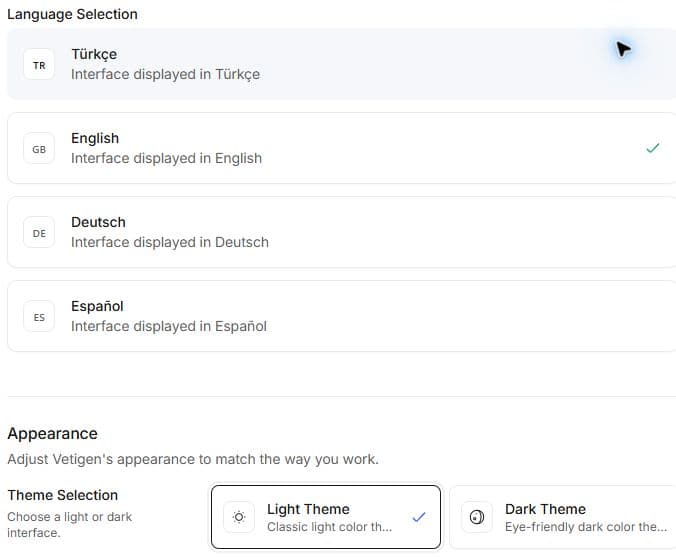
Choose language and appearance in General. Personal phone and account details are outside the screenshot.
- In General, review name, photo and offered language/appearance choices.
- Complete the profile save and verify the new photo.
- Enter national phone and country code together for changes.
- Complete OTP verification. Saving profile text does not verify a phone.
- Recheck current account; do not edit someone else's account on a shared computer.
Notifications and Veti
Review category/channel and quiet hours; OS app permission is separate. Disabling a category does not cancel its appointment/task.
Distinguish personal from clinic Veti preferences. Clinic changes can affect clinic-wide behaviour and require separate access. Veti edits auto-save; do not wait for a separate Save/Revert button. On load failure use retry; on save failure the draft remains editable. Use the same-draft retry and inspect outcome.
Personal signature
- Open creation/change in Signature.
- Displayed name comes from your account and is read-only; editable title is separate.
- Preview offered drawing, upload or text appearance.
- Confirm and check saved signature/history.
A saved signature does not grant authority to sign every examination. Clinician signature and owner consent are different evidence. Historical documents are not automatically re-signed.
Sessions
Inspect current devices/sessions in Security and read confirmation for the intended termination. Signing out requires sign-in on that device. Use sign-in recovery for phone/login issues. Desktop profile/PIN is separate from normal web-session work.
Example: check category/channel and OS permission for missing notifications; do not create another appointment to compensate.