

Allergies, weight and health history
Manage measurements and health records from the correct patient detail.
Platform · Last verified:
Open patient detail and verify name/owner and clinic context. History, allergy, weight, vitals and examination are separate record types; a profile summary does not show the entire history.
Weight history
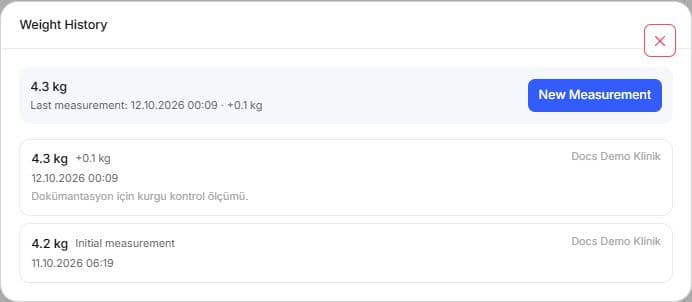
Both readings are fictional. The follow-up was added as a separate record without replacing the earlier row; read the latest value and full history separately.
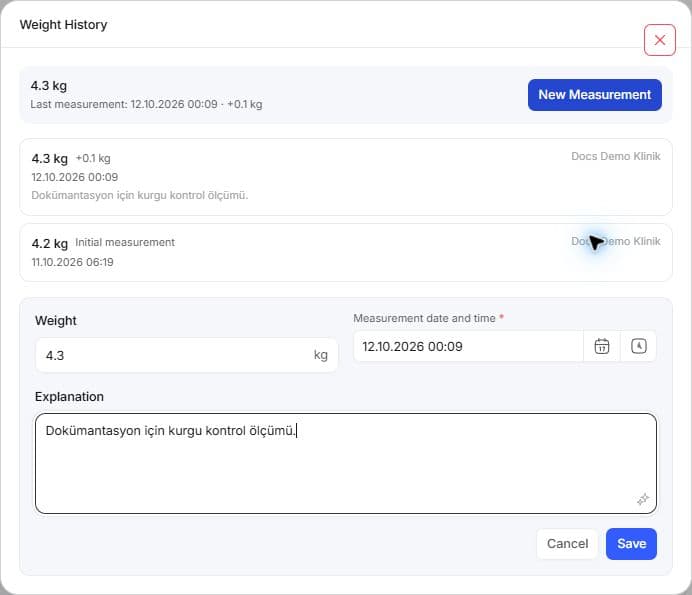
- Open the weight-history entry and inspect measurement time and kg value.
- For a new measurement, enter actual weight, time and optional note using the local decimal format.
- Save and check the dated row and current weight presentation.
- Correct an erroneous measurement through an allowed edit/remove action. A historical undated baseline may be shown differently; do not invent its date.
Example: if Luna weighs 4.2 kg today, create today's measurement rather than overwriting last month's 4.0 kg as a new reading. Edit the earlier row only if it was wrong.
Allergies
Select the correct catalog allergy and severity; creation requires both. Complete reaction, notes and onset date from known information. In editing, correct the same finding's description rather than replacing it with another allergy. Search the Allergies tab first. Open creation and enter the allergy and clinical description from known information. Use an existing record's permitted edit action. Deletion needs separate confirmation; correcting history and deciding an allergy has resolved are different decisions. Some older records may offer resolution; use it only when visible and eligible. Reopen the result from the list.
Vitals and other history
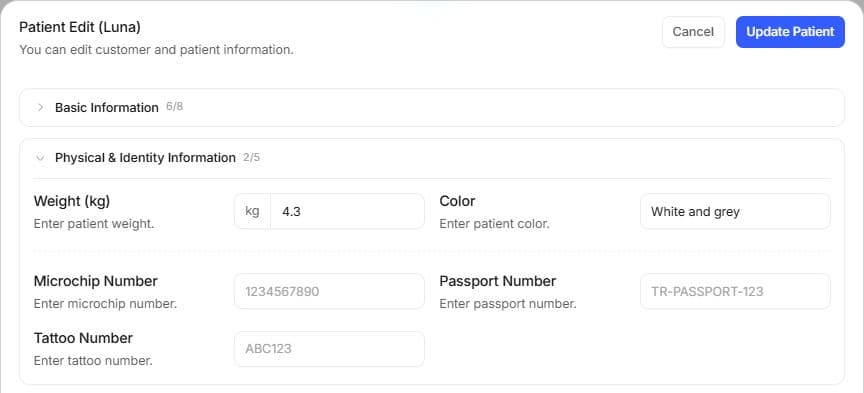
Identity/biographical fields and dated measurement history are separate surfaces. Use New Measurement in weight history for a new reading.
Use Vital signs for a new measurement or existing-record selection. Verify date, unit and patient. Linking a measurement to an examination/inpatient stay is not measuring again. Examination, medication, prescription, vaccine, diagnostic, surgery, hospitalization, operation and file rows open their own details.
A note does not create administration or stock movement. Inspect date, performing clinic and state; unavailable records are not absence. SOAP, treatment/administration, files.